
Forum discussions are a great way to connect online. The Companion Toolkit includes Extra Help Q&A Forums, and our Online Review Courses include Q&A Forums. Here's how they work in the Learning Center.
You have the following options:
- Reading
- Searching
- Subscribing/following (on the forum level or a single discussion)
- Replying to a discussion post
- Starting a new discussion
Each forum can have discussions. Each discussion consists of messages (an initial post and replies).
Forum Home Page
We have a typical forum home page below with some markings to help identify things:
- Search - red arrow (upper left) - searches all forums in a course
- Add a new discussion - turquoise arrow (next to search)
- View a discussion - blue arrow (Discussion column)
- Subscribe / unsubscribe - orange circles:
- Subscribe to forum button - whole forum
- On/Off slider switch - just that discussion
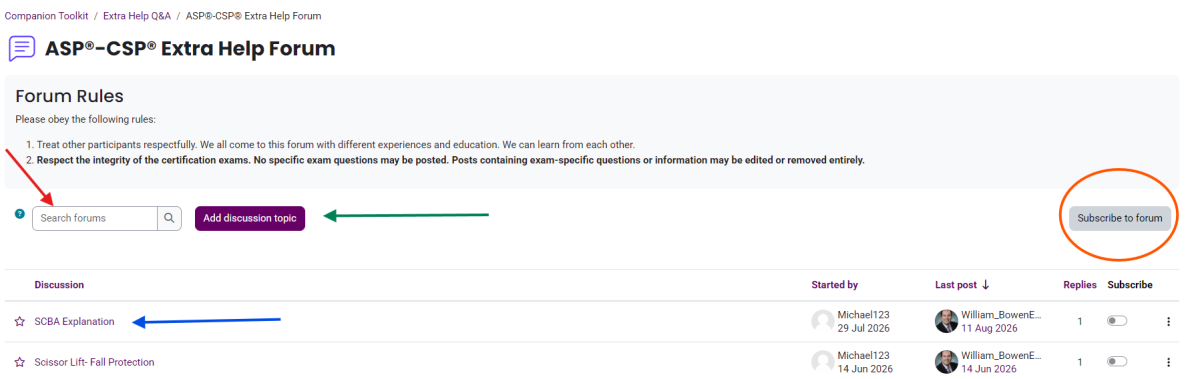
The Subscribe to forum button switches to Unsubscribe from forum after you subscribe to a forum. Use that button to unsubscribe.
Discussion Page
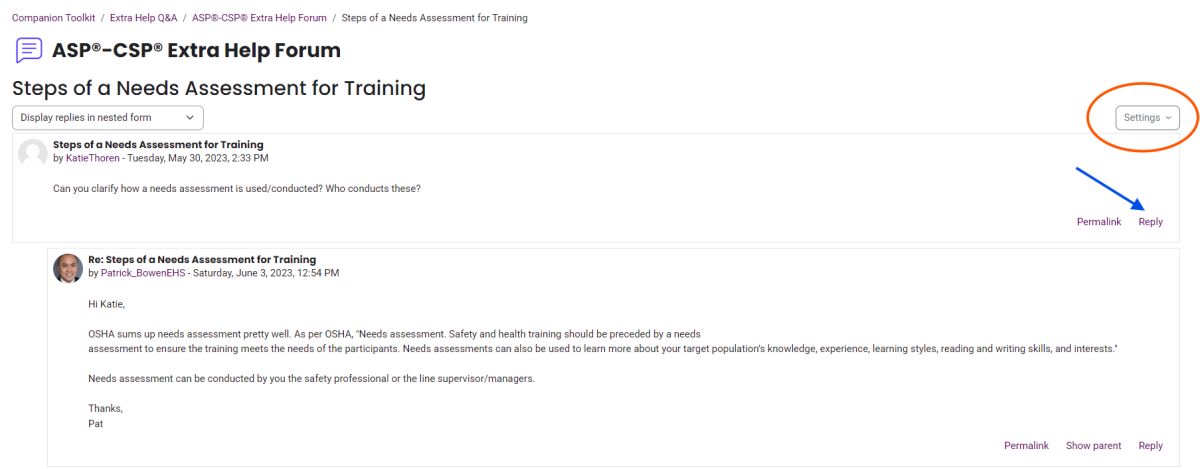
Below is a discussion page.
You can:
- Subscribe to and star the discussion (orange circle). You can also undo these in the same settings dropdown menu.
- Add a reply by clicking the reply at the bottom of the initial post (red arrow). Note that all replies also have a reply link at the bottom of their messages so that you can insert your reply where it makes the most sense.
- Navigate to different discussions at the bottom of the page.

